
Set up dosing · Section 7
Tubing and pump direction
Match each pump to its tubing and set which way it turns.
Tell the device which tubing is in each pump and which way it turns. Do this before priming and calibrating.
| Setting | Tubing | Use for | Top speed |
|---|---|---|---|
| Standard | White | All chemicals except tire shine | 5.0 mL/s |
| Tire Shine | Black | Tire shine | 3.0 mL/s |
Match the setting to the tubing in the pump. It sets the top speed and the tubing-life count.
On the device
- In setup mode, tap Pump Config.
- Choose the tubing and the direction for each pump.
- Tap Save.
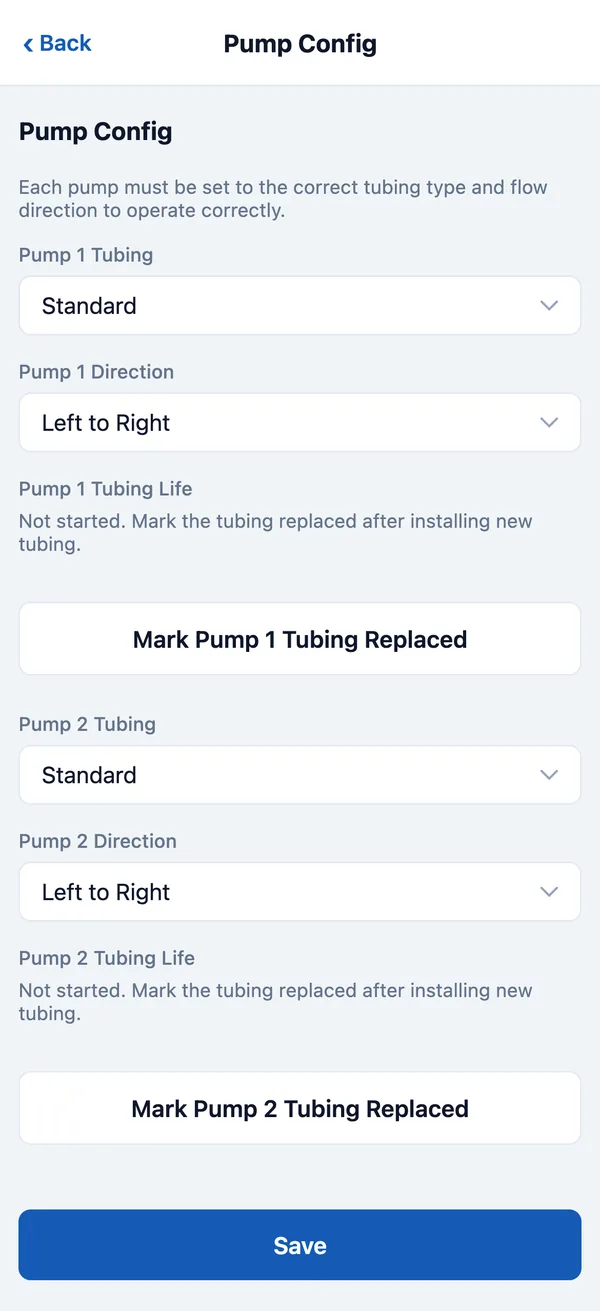
Check the direction when you prime: chemical should move from the container toward the wash. If it moves backward, stop, change the direction, and save.
On DozaLink
On the device’s page, pick the pump at the top. Under Chemical and tubing, set Tubing, Direction (admins), and Chemical, then click Save to device.