
Set up dosing · Section 10
Set up wash triggers
Choose which pump each signal runs and how much it doses.
For each input and each pump, choose what happens when the wash signal turns on. Either input can run Pump 1, Pump 2, or both. Wiring is covered in Wire the wash signals. To run a pump at set times with no wash signal, see Dose on a schedule.
Dispense a set amount, or until it turns off?
| Dispense a set amount | Dispense until it turns off | |
|---|---|---|
| In one line | The relay is a start button. One pulse = one fixed dose. | The relay is a hold-to-run switch. Pump runs while it is on, stops when it goes off. |
| How much comes out | The Amount each time you enter. Example: 3 mL per car at 1.0 mL/s takes 3 seconds. | Depends how long the controller holds the signal. Example: 1.0 mL/s for a 20-second arch = 20 mL. |
| If the signal drops early | Pump keeps going until the dose is finished. | Pump stops right away. |
| If the signal stays on | Nothing extra. It must go off and on again for the next dose. | Pump keeps running until the signal drops or a safety limit is hit. |
| Good for | A set amount per car. Controllers that pulse briefly. Most chemical dosing. | Chemical that should flow the whole time a step is on. Controllers that hold the output on for the step. |
Settings
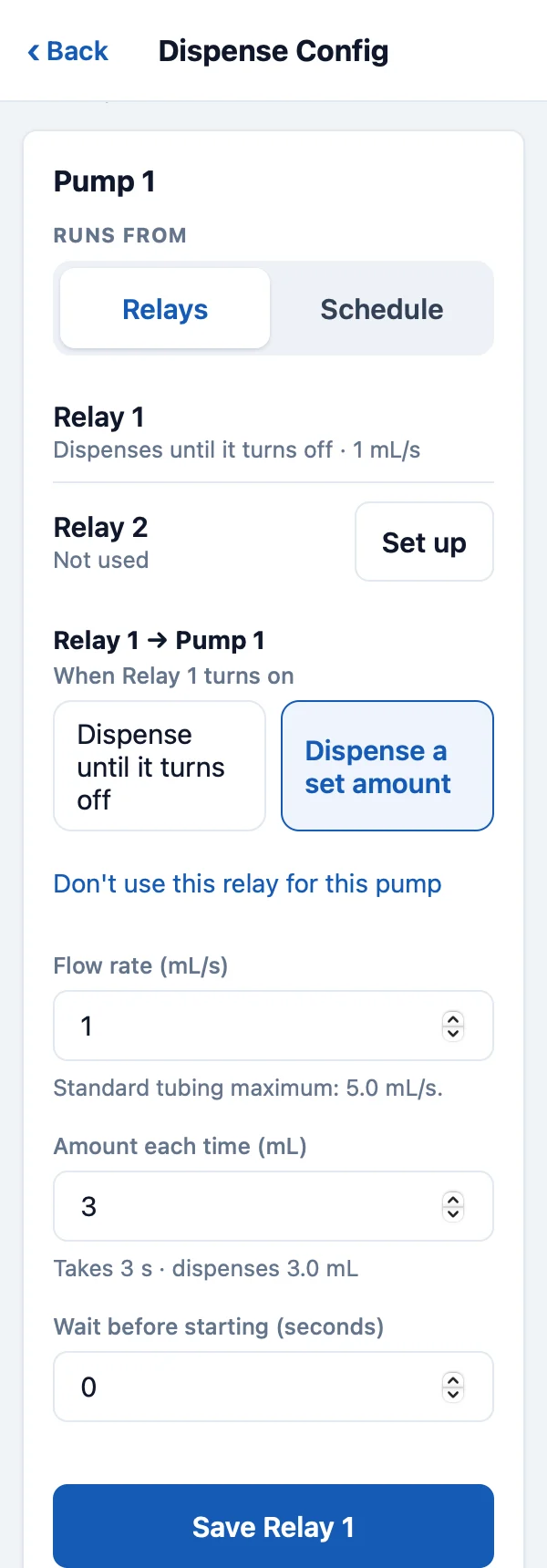
| When Relay 1 turns on | Dispense until it turns off or Dispense a set amount. Don’t use this relay turns the pair off. |
|---|---|
| Flow rate (mL/s) | Pump speed. Up to 5.0 for white tubing, 3.0 for black. |
| Amount each time (mL) | Set amount only. The pump runs whole seconds, so the page shows what it will dispense, for example Takes 13 s · dispenses 10.4 mL. |
| Wait before starting (seconds) | Wait 0–300 seconds after the signal before pumping. |
| Maximum run time (seconds), Maximum volume (mL) | Until it turns off only, under Safety limits. Stops the pump if the signal stays on too long. |
- A set amount starts when the signal turns on. The signal must turn off and on again for the next dose, including after power-up or a Safety Stop.
- Signals that arrive while a set amount is running are ignored.
- With Dispense until it turns off and a wait, the signal must still be on when the wait ends.
- Leave unused relay and pump pairs as Not used.
Set it on the device
- In setup mode, tap Dispense Config. In the pump’s card, keep Runs from on Relays.
- Tap Edit or Set up on the relay (Relay 1 or Relay 2).
- Choose Dispense until it turns off or Dispense a set amount, enter the settings, and tap Save Relay 1. Repeat for each pair you use.
To make the same changes from anywhere, see Change doses at any site.
Test
Run each wash function with the outlet in a measuring container. Check that only the intended pump runs and that the amount is right. The red Safety Stop button in Dispense Config stops all pumps.